


Description
AJ Player – Android HD & 4K Video Player App | MX-Style Clone | All Format Video Player
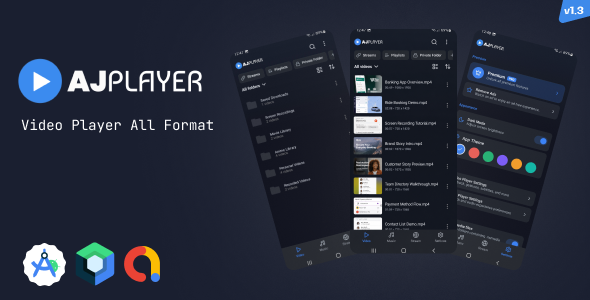
AJPlayer – The Ultimate Video Player and MX / Arc Player Clone
Searching for a high-performance modern video player built for the future?
AJPlayer competes with MX-style / Arc Style and other advanced media players available in the market. Built with Kotlin and Jetpack Compose, it delivers modern architecture, smooth performance, and a future-ready codebase.
With powerful gesture controls, background playback, folder browsing, and a sleek 60fps UI, AJPlayer provides a premium, scalable solution for developers and entrepreneurs.
We are strictly committed to Regular Updates!
Buying this source code is an investment. We don’t just sell code; we build partnerships. We guarantee frequent updates to keep the app compatible with the latest Android versions and Play Store requirements.
Why This is the Best Choice?
- Better Technology: Unlike old Java-based players, we use 100% Jetpack Compose.
- User-Friendly Ads: Our “Watch to Earn” monetization is designed to keep users happy while maximizing your revenue.
- Community Driven: We build what YOU want. Our roadmap is decided by our buyers’ feedback.
Live Demo & Preview
Test the app yourself on your own device!
- Download APK Demo: [ DOWNLOAD ]
Key Features
- 100% Native Jetpack Compose UI – Modern Android UI built fully with Compose.
- Media3 / ExoPlayer Engine – Fast, reliable playback with advanced buffering and decoder fallback.
- Local Video Auto-Discovery – Scans and organizes videos across folders automatically.
- Folder + File Browsing – Browse by folders or all videos with smooth navigation.
- Smart Search, Sort & Filter – Quickly find videos by name and organize by date, name, length, etc.
- Playback History & Resume – Continue from last watched position with resume controls.
- Playlist Management – Create, rename, edit playlists and add/remove videos.
- Network Stream Support – Play direct URLs, HLS streams, and M3U/M3U8 playlists.
- Background Playback – Keep audio playing with MediaSession/notification controls.
- Mini Player Bar – Quick play/pause/stop controls while browsing the app.
- Picture-in-Picture (PiP) – Auto/manual PiP for seamless multitasking.
- Advanced Gesture Controls – Seek, volume, brightness, double-tap, long-press, and pinch zoom.
- Audio / Subtitle / Quality Controls – Select tracks, load external subtitles, and switch video quality.
- Sync Controls – Fine-tune audio delay and subtitle timing.
- Playback Customization – Speed control, aspect ratio modes, video mirror, and A-B repeat.
- Autoplay & Player Preferences – Autoplay next, seek interval, default orientation, and more.
- Audio Equalizer: Fine-tune your audio experience.
- Decoder: Hardware (HW) and Software (SW) decoding options
- Theme Personalization – Multiple app themes plus dark mode support.
- Built-in File Actions – Rename, delete, share, and view detailed media properties.
- AdMob Monetization – Banner, interstitial, and rewarded ads with temporary ad-free rewards.
- Dedicated Music Player – Browse songs, albums, artists, folders, playlists, favorites, and recently played music.
- Private Folder – Protect private videos with PIN-based access and restore them when needed.
- In-App Purchases – Monthly, yearly, and lifetime premium plans with ad-free and unlimited playlist unlocks.





There are no reviews yet.