


Description
ScanifyAI – Document Scanner & OCR App | Android
ScanifyAI – Smart AI Document Scanner (PDF & OCR)
Download Demo APK Click to Download APK
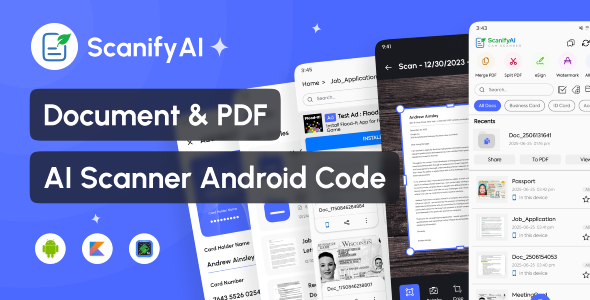
ScanifyAI is an AI-powered smart document scanner that transforms your Android device into a powerful PDF scanner. Whether you need to scan documents, ID cards, books, or handwritten notes, ScanifyAI offers everything you need with high-quality output and intelligent features — just like CamScanner, but better and ready to publish.
With smart edge detection, auto cropping, powerful filters, and OCR text recognition, this app is your go-to solution for digital scanning and file management, all in a clean and modern UI.
Key Features
- Smart Camera Scanner – Scan documents, books, ID cards, receipts, and more
- Auto Crop & Edge Detection – AI-enhanced cropping for accurate results
- Enhance with Filters – Sharpen, brighten, or grayscale your scans
- Save as PDF or Image – Multiple export format options
- OCR Text Recognition – Extract text from images (multi-language support)
- Multi-Page PDF – Combine multiple scans into one document
- ️ Built-in File Manager – Rename, delete, and organize scanned files
- One-tap Sharing – Share via email, WhatsApp, Drive, etc.
- Dark Mode – Beautiful modern UI with light/dark support
What You Get
- ✅ Full Android Studio Source Code (Kotlin & Java)
- ✅ Modular, clean, and well-commented code
- ✅ Material XML UI Design
- ✅ AdMob Integration (Banner, Interstitial, Native Ads)
- ✅ Full Documentation for Setup & Customization
⚙️ Tech Stack
- Android Studio (SDK 36)
- iText / PdfRenderer
- Scoped Storage for Android 10+
- Material Components UI
✅ Ideal Use Cases
- Scanning receipts, notes, and certificates
- Creating PDFs from paper documents
- Digitizing books and study material
- Scanning ID cards and official documents
Easy Reskin & Customization
This app is ready for branding and publishing. You can easily customize:
- App Name & Logo
- Theme Colors & Fonts
- AdMob Integration
- Default Language & Settings






There are no reviews yet.