


Description
Project Management Enhancements Module for Perfex CRM
Note: This is a module for Perfex CRM, not a standalone script. This module works best on Perfex CRM version 3.2.1 and later. We recommend testing this module on a staging copy before deploying to your production Perfex instance. This module may not work if you are using Perfex CRM as a SaaS service.
LIVE DEMO
To see a live demo for this module, use the login details below:
Username: demo@email.com
Password: 2sQzy&7bzPc!Oh
Login here.
Project Management Enhancements Module for Perfex CRM allows you to take your project management capabilities to the next level. This Perfex module has been designed to elevate your productivity and streamline team collaboration. Packed with powerful features, this module redefines how you manage tasks, communicate with your team, and organise your projects.
WHAT’S NEW
Introducing Global Task Types for Projects!
We’re excited to introduce Global Task Types – a smarter way to manage task types across all your projects. Now you can define task types just once and apply them universally, saving you time and ensuring consistency.
When creating a new task type, you’ll have flexible options to control its scope:
- Add to existing projects: Instantly applies this task type to all current projects
- Add to future projects: Automatically includes this task type in every new project you create
Choose one or both options based on your needs. This powerful feature eliminates repetitive setup while giving you complete control over where your task types appear.
Global Task Types can be managed in Setup -> Settings -> Global Task Types for Projects.
OTHER MAIN FEATURES
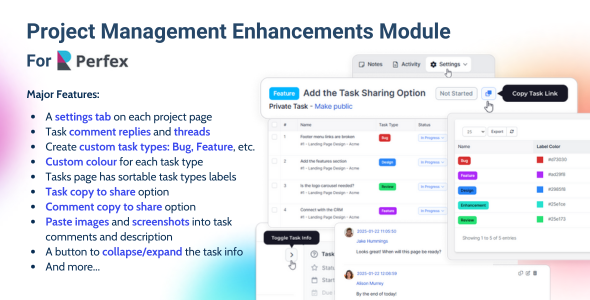
- Project Notes Redefined: Perfex CRM originally allowed only a single note per project, but we have enhanced this feature to give you greater flexibility. Now, you can create unlimited project notes, edit, delete, and pin important notes to keep them easily accessible. Stay organised with multiple notes and ensure key project details are always at your fingertips.
- Task ID on the Task Popup: We have added the Task ID to the task popup for quick reference. This makes it easier to track and share tasks without needing to open the full task details.
- Expandable Comment Threads: We’ve improved comment threads to enhance clarity. Previously, long comment threads could get confusing, with no clear indication of where the replies ended. Now, any comment with replies will display the number of replies, and users can click to view them. This keeps the task comment section clean and organised, making it easier to follow discussions.
- Task Highlights: Stay on top of project updates effortlessly! With our latest feature, any task with recent changes will be automatically highlighted in the task list, ensuring you never miss an important update. Tasks will be highlighted when a new comment or reply is added on a task, a comment thread is updated, the task status changes. The updated tasks will be highlighted for task assignees and task followers.
- Task Types: Categorise tasks as general tasks, bugs, or new features, or customise your own. Add task types directly from the introduced project settings menu to suit your project needs, with default options like bug, feature, and task. Currently, task types are project-specific. This means a task must either be created within a project or linked to a project for the task type field to display its options when creating the task.
- Custom Label Colours for Task Types: Personalise task labels with custom colours. Use the colour picker or paste your preferred hex code to design task labels that visually align with your workflow.
- Image and Screenshot Pasting in Task Comments: Easily communicate with your team by pasting images and screenshots directly into task comments. Images are displayed in full screen when clicked, ensuring clarity in collaboration.
- Image and Screenshot Pasting in Task Descriptions: Add visuals directly to task descriptions to provide detailed explanations and improve understanding.
- Task Sharing via Link: Easily share tasks with your team using the one-click copy link option, available on both the task details page and the task list page.
- Comment Sharing via Link: Share specific comments with your team using the copy-link button. When your other team members access this shared comment via the provided link it automatically scrolls to it, ensuring precise communication.
- Task Info Toggle Button: Simplify navigation in tasks with a toggle button that expands or collapses task details. Maximise space for reading task descriptions and comments when needed.
- Reply to Task Comments: Team members can now work more effectively with the ability to organise discussions into clear, focused threads. This feature ensures that conversations stay relevant, making it easier to track ideas, resolve issues, and communicate seamlessly within tasks.
- Project Owners: You can assign different owners to different projects, giving designated leaders full visibility of all tasks within their projects without individual assignments. Simply select project owners in the dropdown when creating or editing a project—they will automatically be added as task followers for all tasks within that project.
- More Features Already in Development: Stay tuned for even more functionality to help you optimise your project management workflows. You can also send us feature requests.





There are no reviews yet.